- Arduino UNO
-
- Arduino Leonardo
-
- Arduino NANO
-
- Arduino Pro mini
-
- Arduino Pro micro
-
- ESP8266 GPIO
-
- NodeMCU 1.0 (ESP8266)
-
- WeMos D1 mini (ESP8266)
-
- NodeOLED (ESP8266)
-
- ESP-01 (ESP8266)
-
- ESP32 DevBoard (ESP32)
-
- Node ESP-32S (ESP32)
-
- Ai-Thinker ESP12K (ESP32-S2)
-
- Mediatek Linkit 7697 Nano
-
- Mediatek Linkit 7697 Nano Board
-
- Mediatek Linkit 7697 Bit
-
- Microbit
-

2022年2月13日 星期日
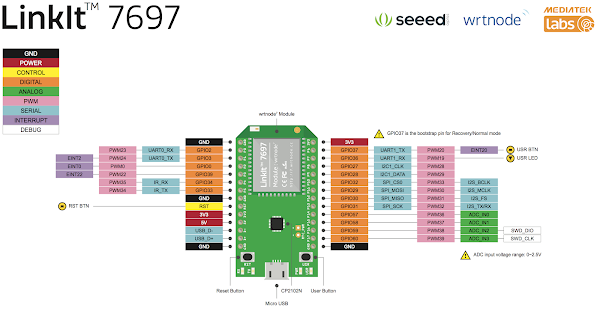
常用微控制板接腳圖 (Pin Layout)




2021年6月10日 星期四
瞭解 Arduino 變數占用的記憶體大小
Arduino 的記憶體空間非常寶貴,Arduino 也不擅長處理大量的資料,因此為變數宣告合適的資料型態,盡量節省記憶體空間,將可以提高程式的執行效率。
幾款常見的 Arduino 規格
- Arduino UNO
-

- Microcontroller:ATmega328P
- Operating Voltage:5V
- Input Voltage (recommended):7-12V
- Input Voltage (limit):6-20V
- Digital I/O Pins:14 (of which 6 provide PWM output)
- PWM Digital I/O Pins:6
- Analog Input Pins:6
- DC Current per I/O Pin:20 mA
- DC Current for 3.3V Pin:50 mA
- Flash Memory:32 KB of which 0.5 KB used by bootloader
- SRAM:2 KB (ATmega328P)
- EEPROM:1 KB (ATmega328P)
- Clock Speed:16 MHz
- LED_BUILTIN:13
- Arduino Nano
-

- Microcontroller:ATmega328
- Architecture:AVR
- Operating Voltage:5 V
- Flash Memory:32 KB of which 2 KB used by bootloader
- SRAM:2 KB
- Clock Speed:16 MHz
- Analog IN Pins:8
- EEPROM:1 KB
- DC Current per I/O Pins:40 mA (I/O Pins)
- Input Voltage:7-12 V
- Digital I/O Pins:22 (6 of which are PWM)
- PWM Output:6
- Power Consumption:19 mA
- Arduino Leonardo
-

- Microcontroller:ATmega32u4
- Operating Voltage:5V
- Input Voltage (Recommended):7-12V
- Input Voltage (limits):6-20V
- Digital I/O Pins:20
- PWM Channels:7
- Analog Input Channels:12
- DC Current per I/O Pin:40 mA
- DC Current for 3.3V Pin:50 mA
- Flash Memory:32 KB of which 4 KB used by bootloader
- SRAM:2.5 KB (ATmega32u4)
- EEPROM:1 KB (ATmega32u4)
- Clock Speed:16 MHz
- Arduino MEGA 2560
-

- Microcontroller:ATmega2560
- Operating Voltage:5V
- Input Voltage (recommended):7-12V
- Input Voltage (limit):6-20V
- Digital I/O Pins:54 (of which 15 provide PWM output)
- Analog Input Pins:16
- DC Current per I/O Pin:20 mA
- DC Current for 3.3V Pin:50 mA
- Flash Memory:256 KB of which 8 KB used by bootloader
- SRAM:8 KB
- EEPROM:4 KB
- Clock Speed:16 MHz
- LED_BUILTIN:13


資料類型的補充說明
從上面的規格介紹我們知道,除了 Arduino MEGA 2560 以外,其他的幾個型號的 Flash Memory 都只有 32 KB,而且還需要再從這裡面分出一些給 bootloader,所以,程式可以用到的記憶體真的不多,因此節約記憶體就成為一件重要的事。
ESP32 處理器是 32 位元的處理器,其 int 和 double 類型佔用的記憶體容量和 8 位元處理器不同。如下表所示,淺藍色是 8 位元 (Uno 板),深藍色 32 位元 (ESP32 版):
| 類型 | 中文名稱 | 佔用記憶體大小 | 可表示數值範圍 |
|---|---|---|---|
|
16 bits 32 bits |
-2147483648~2147483647 |
||
浮點數 |
32 bits 64 bits |
±1.7E+308 |
|
根據文獻資料,Arduino 程式也支援 1999 年制定的 C 程式語言 C99 標準的整數類型寫法,採資料佔用的位元數來定義。如此可避免不同微控制器,對整數數字範圍定義不一致的情況。定義如下表:
| 類型 | 等同的類型 |
|---|---|
| int8_t | char |
| uint8_t | byte |
| int16_t | 8 位元處理器的 int |
| uint16_t | 8 位元處理器的 unsigned nint |
| int32_t | long 或 32 位元處理器的 int |
| uint32_t | unsigned long 或 32 位元處理器的 unsigned int |
在 Arduino UNO 裏宣告 int 會占用 16bit(2byte),若是在 Arduino Due 裏宣告 int 則會占用 32bit(4byte)。
如果使用 uint8_t 來宣告變數,只會占用 8bit(1byte),雖然 Arduino 沒有提到 uint8_t 也可以用來宣告變數,但因為 Arduino 是走 C 家族的編譯環境,而 uint8_t 就是 C 家族合法的資料型態,因此您可以放心地使用 unint8_t 來宣告變數,如此可以節省不少記憶體空間。
底下有一個程式可以列出資料型態所占用的記憶體空間是多少:
範例程式
// Arduino DatatypeSize v2 - Display information about data types used in Arduino
// Created by Michael 'TeX' Hex - http://www.texhex.info/
//
// Full list of all data types:
// http://arduino.cc/en/Reference/HomePage -> Section "Data Types"
//
// Additonal references:
// http://www.arduino.cc/playground/Code/DatatypePractices
// http://arduino.cc/en/Reference/VariableDeclaration
//
// Any text in this sketch is taken from the Arduino homepage,
// licensed under a Creative Commons Attribution-ShareAlike 3.0 License.

void setup()
{
  Serial.begin(9600);
}

void loop()
{
  Serial.println("--- Variable type: Size in SRAM (bytes) ---");

  // C standard data type "unsigned int length 8 bits".
  // Occupies one byte of memory.
  // http://arduino.cc/forum/index.php/topic,41590.0.html
  // http://en.wikipedia.org/wiki/Stdint.h#Fixed_width_integer_types
  Serial.print("uint8_t: ");
  Serial.println(sizeof(uint8_t));

  // A boolean holds one of two values, true or false.
  // Each boolean variable occupies one byte of memory.
  // http://arduino.cc/en/Reference/BooleanVariables
  Serial.print("boolean: ");
  Serial.println(sizeof(boolean));

  // A data type that takes up 1 byte of memory that stores a character value.
  // Character literals are written in single quotes, like this: 'A' (for multiple
  // characters - strings - use double quotes: "ABC").
  // http://arduino.cc/en/Reference/Char
  Serial.print("char: ");
  Serial.println(sizeof(char));

  // An unsigned data type that occupies 1 byte of memory. Same as the byte datatype.
  // The unsigned char datatype encodes numbers from 0 to 255.
  // For consistency of Arduino programming style, the byte data type is to be preferred.
  // http://arduino.cc/en/Reference/UnsignedChar
  Serial.print("unsigned char: ");
  Serial.println(sizeof(unsignedu char));

  // A byte stores an 8-bit unsigned number, from 0 to 255.
  // http://arduino.cc/en/Reference/Byte
  Serial.print("byte: ");
  Serial.println(sizeof(byte));

  // Integers are your primary datatype for number storage, and store a 2 byte value.
  // This yields a range of -32,768 to 32,767 (minimum value of -2^15 and a maximum value of (2^15) - 1).
  // http://arduino.cc/en/Reference/Int
  Serial.print("int: ");
  Serial.println(sizeof(int));

  // Unsigned ints (unsigned integers) are the same as ints in that they store a 2 byte value.
  // Instead of storing negative numbers however they only store positive values, yielding a
  // useful range of 0 to 65,535 (2^16) - 1).
  // http://arduino.cc/en/Reference/UnsignedInt
  Serial.print("unsigned int: ");
  Serial.println(sizeof(unsigned int));

  // A word stores a 16-bit unsigned number, from 0 to 65535.
  // Same as an unsigned int.
  // http://arduino.cc/en/Reference/Word
  Serial.print("word: ");
  Serial.println(sizeof(word));

  // Long variables are extended size variables for number storage, and store 32 bits (4 bytes),
  // from -2,147,483,648 to 2,147,483,647.
  // http://arduino.cc/en/Reference/Long
  Serial.print("long: ");
  Serial.println(sizeof(long));

  // Unsigned long variables are extended size variables for number storage, and store 32 bits (4 bytes).
  // Unlike standard longs unsigned longs won't store negative numbers, making their range from 0
  // to 4,294,967,295 (2^32 - 1).
  // http://arduino.cc/en/Reference/UnsignedLong
  Serial.print("unsigned long: ");
  Serial.println(sizeof(unsigned long));

  // Datatype for floating-point numbers, a number that has a decimal point.
  // Floating-point numbers can be as large as 3.4028235E+38 and as low as -3.4028235E+38.
  // They are stored as 32 bits (4 bytes) of information.
  // http://arduino.cc/en/Reference/Float
  Serial.print("float: ");
  Serial.println(sizeof(float));

  // Double precision floating point number. Occupies 4 bytes.
  // The double implementation on the Arduino is currently exactly the same as the float,
  // with no gain in precision.
  // http://arduino.cc/en/Reference/Double
  Serial.print("double: ");
  Serial.println(sizeof(double));

  delay(8500);
}
訂閱:
文章 (Atom)